

Talo Guide
Meetings
Record a meeting with notice, notes with verified sources, live copilot, and memory per project
Meetings records and transcribes on this Mac, with notice to participants, and turns the transcript into notes with verified sources, a brief for your next call, and cards for the people you meet with. The transcript stays local; what gets sent to an assistant to generate notes or answer a question goes through the engine you have configured (Claude Code or Codex) and may reach their provider.
Before recording: the notice
- Open the meeting from the calendar or click "New meeting". The top bar shows if it has started and offers "Notify and record" (⌘R).
- The "Before recording" sheet requires you to notify participants. Copy a message for the meeting chat or text to read aloud, and check "I've notified participants" before you can start.
- Talo records how and when you notified them along with the meeting.
Important
A private meeting or one without a confirmed project never reaches an AI assistant. Talo blocks it before generating anything (meeting_notes_ai_not_allowed), and the screen after explicitly says so.
During the meeting
The notes pad takes the center. What you write saves only to my-notes.md inside the meeting folder. Below, the transcript appears live (expand with ⌘⇧T) with "You" and "Others"; you can confirm a speaker's name with a click.
If you minimize Talo or switch apps, a floating indicator keeps showing the time, the last phrase, and pause/stop buttons, and a red dot with the time appears next to "Meetings" in the sidebar. If the call goes silent after the expected end time, Talo offers to stop automatically after 30 seconds.
Live copilot
To the right of the note, collapsed by default, the copilot listens silently. When someone asks a question that the memory, documents, or project tasks know how to answer with a source, a card appears with the suggested answer and its citation. It never speaks in the meeting or appears to the other participants. Only you see it. If there's no relevant source, Talo doesn't call the assistant. It won't risk inventing an answer without support.
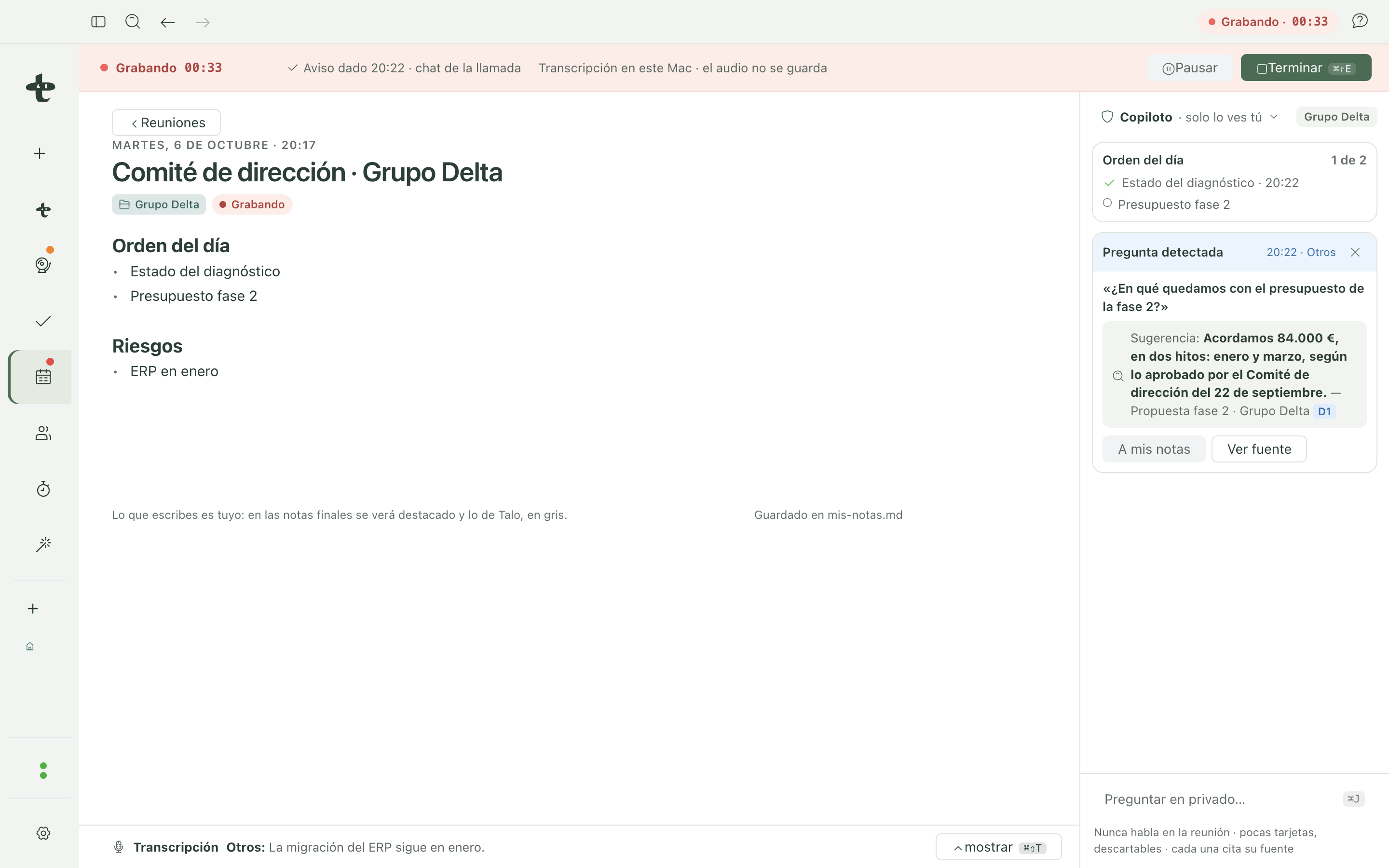
You can ask it something privately anytime with ⌘J, without waiting for it to detect a question.
After: notes with verified sources
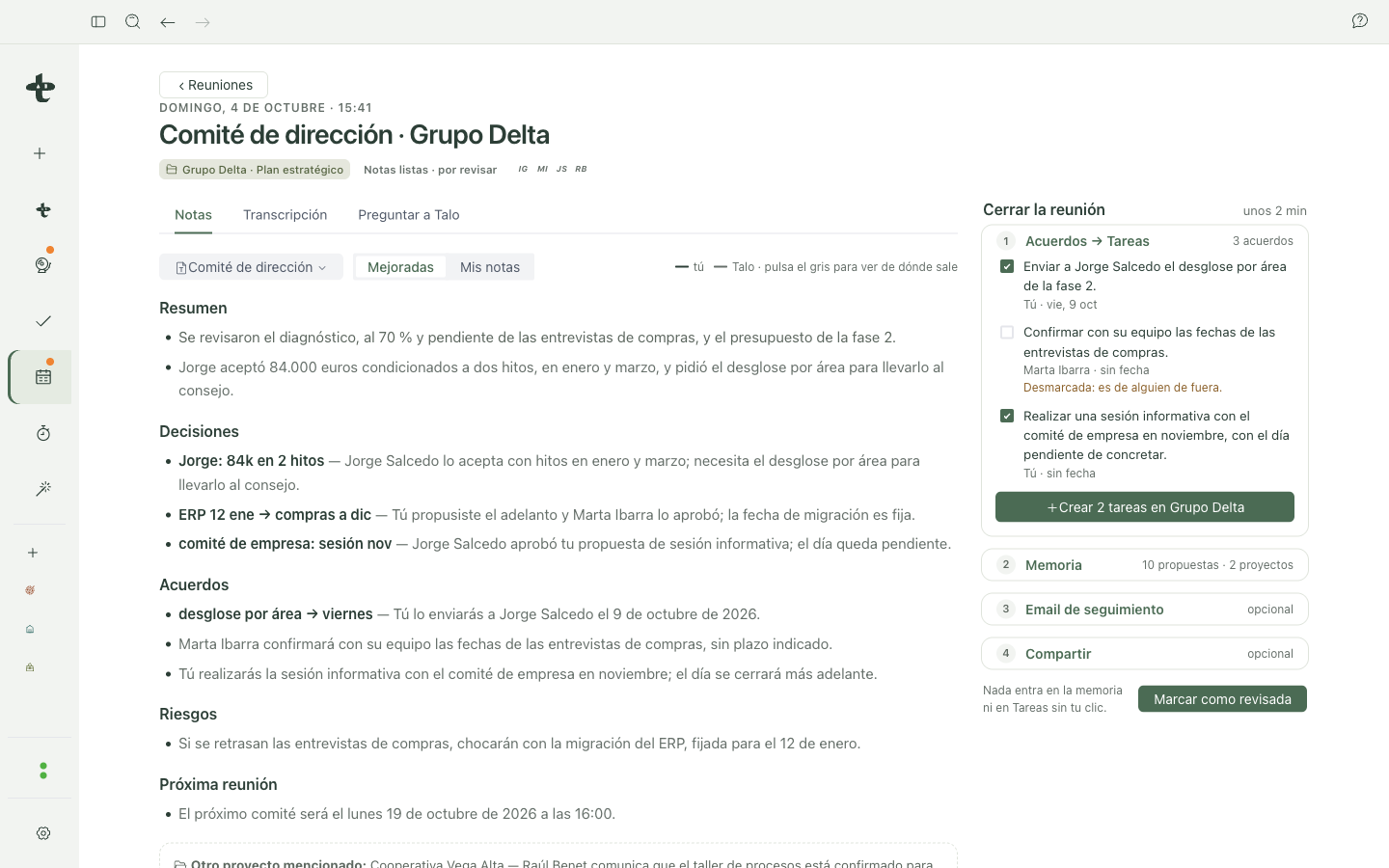
When it finishes, Talo generates notes with one of its templates (you can change it). What you wrote appears as-is, without rewriting; what Talo adds is visually distinct and each citation links to the exact phrase in the transcript. A statement without a citation backing it up is marked NO SOURCE instead of sneaking in as a fact, and is never suggested as a task or memory.
Close the meeting
The "Close meeting" panel brings together in one place:
- Agreements → become cards on the project's Tasks board, with a link back to the meeting.
- Memory proposals: go through the same decision card as the rest of Talo. Nothing saves to memory without your approval.
- Follow-up email → a draft you open in Mail or copy; Talo never sends it for you.
- Export to Word or PDF, or copy the summary.
Finish with "Mark as reviewed".
Multiple projects in the same meeting
If an agreement or topic from another of your projects is mentioned in the meeting, Talo detects it, but never links it alone. It proposes ("Also discussed: Vega Alta Cooperative: Link?") and only counts if the text itself or a verified citation names it. A linked project sees that meeting as "Mentioned in", with only the part that belongs to it. Never the other client's transcript.
Search what was said
⌘K also searches inside your past meeting transcripts and notes. The result shows the meeting, who said it, and the exact minute.
Retention and deletion
In Settings › Meetings › "Retention and deletion" you choose how long transcripts are kept (3, 6, 12, or 24 months, or as long as the project exists; 12 months by default). Audio is never saved. You can delete a single meeting, all transcripts from a project, or what a specific person said. Preview before confirming, because it's irreversible.
Import an already-recorded meeting
If you already have audio or video of a meeting (m4a, mp3, wav, aac, ogg/opus, flac, mp4/mov/webm), "New meeting → Import recording" transcribes it on this Mac with the same engine, with speaker separation, and follows the same path as a live-recorded meeting: same notes, same "Close meeting", same memory. See Import for the full details, including importing an entire project.
What reaches an AI assistant
Generating notes, answering a copilot question, or preparing a brief are short turns of the engine you have configured (Claude Code or Codex), confined and without their own memory, that are discarded when done. What they see are the transcript fragments needed for that task, never the audio recording (which isn't saved). Before recording sensitive information, review Privacy and security.