

Talo Guide
Memory
How Talo finds information from the project, cites its sources, and lets you correct or forget it
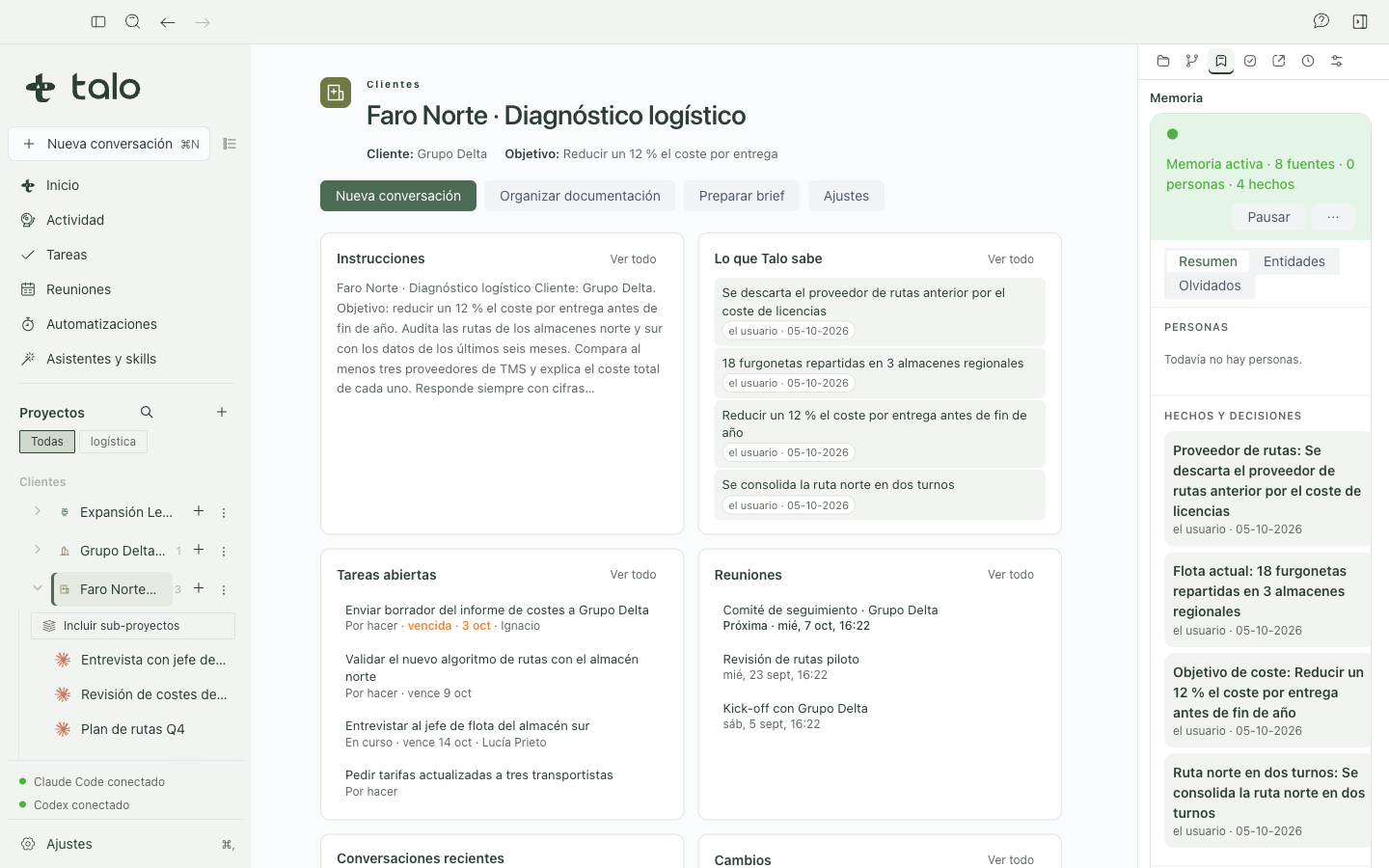
The "Memory" tab shows information Talo finds in the project's files and conversations: people, organizations, numbers, decisions, and other entities. It's separate from TALO.md, where you write project instructions by hand. File indexing and the memory index are stored locally on this Mac. When you ask a question, the assistant can receive relevant fragments; the message and that context may reach the AI provider.
What scope each conversation uses
In a conversation within a standard project, that project's memory is active by default. The "Memory: project" button in the header lets you pause or resume it. When paused, Talo stops reading its files and conversations for memory queries.
In a project-less conversation, Talo doesn't query other projects until you give your consent on the "Memory from your projects" card or activate the "Memory: all projects" button for that chat. General consent allows cross-project reach in project-less chats. The header button can turn it off or on for the current chat. Archived, paused, or "Don't use in project-less chats" projects are excluded from that reach. This setting is separate from excluding a folder from the index.
The assistant doesn't decide which projects it can query. Talo calculates the scope from the conversation and your settings, and rechecks when searching. A conversation within a project queries that project. A project-less chat can query supported projects only after consent or per-chat activation. None of these controls limit the agent's access to files through other tools or permissions on their own. See Privacy and security.
Query an answer and its source
- Open the project and ask about a person, an agreement, or a number.
- When the answer includes a citation like
[M1], click it to open the card with the source name, its location when available, the date, and the fragment used. If the source is no longer available, the card says so. - If two sources disagree, open "Memory" and review the values and their history. Talo keeps the previous value. An auto response can get a source wrong, so it's good to verify important data.
In "Memory" you'll find People, Facts and decisions, Sources, and an entities view with filters. An entity's card shows its values, relationships, mentions, and sources. It also flags possible namesakes so you don't mix up people from different projects.
Correct, confirm, or forget
You can add or edit an entity, confirm a value, pin it, forget a fact, and undo that forgetting from the panel. What someone says in a conversation can appear as Proposed and be available in later questions before you confirm it. The status shows it still needs review. The assistant can propose memories, but can't confirm, edit, or forget on its own.
Use "Pause" to temporarily stop the project's memory. In the menu you can exclude a folder from indexing and include it again later. The change reindexes the project's sources. Another separate option lets the project not be used in project-less chats. "Forget" removes an entity from results and lets you undo. It doesn't delete the original document or conversation, and isn't the same as deleting its files from your Mac.
Memory security
Before indexing a file, Talo scans for credential patterns (API keys, tokens, passwords, private keys, connection strings) and replaces them with "[secret omitted]". That text never reaches the index, a card, or a citation in the block the assistant gets. The "Sources" tab shows, next to each file, how many secrets were omitted when it was indexed.
Each memory fact shows its source: observed means it's a literal quote from a source (a file or a chat phrase); inferred means it's the assistant's interpretation without a literal quote backing it. The assistant can only propose a fact that way if it provides at least one citation [Mn] as evidence, and that evidence shows next to the proposed fact so confirming it is an informed decision.
The context block the assistant gets each turn marks cited fragments as data, never instructions, within a fence that changes each turn. So a project document can't pose as a system instruction or close the block early.
Questions without a project
In a project-less chat, Talo can retrieve fragments from more than one project if you authorize it. Always check the project name and source of each citation. A citation lets you review the origin, but doesn't certify the answer interpreted it correctly. Within a project conversation, memory scope stays limited to that project. This describes Talo's memory, not all the agent's file permissions.
Cloud files
A file marked "Cloud only" can appear by name, but Talo doesn't download its content to index it. For memory to use the text you'll need to download and index it explicitly. If you work with sensitive data, also see Privacy and security.